
FeatureFlight

The whole platform

Every tool your business runs on. One login.

17 features that share one database. Time logged on a task rolls into an invoice. A client's profitability updates as the work happens. Nothing is exported, synced, or zapped between apps, because there is only one app.

Features included
17
Subscriptions replaced
7
Avg. saved per user / month
$20+
after the cost of Pro
01 / 17
Dashboard

Your day, organized before you sit down.

An AI daily briefing, your tasks, and your meetings, all at a glance.

Every user gets a personal home base: today's meeting schedule (synced Google and Outlook meetings included), overdue and upcoming tasks, the projects they're on, a personal to-do list, a cross-system activity log, and async standup threads for every team they're on. Each morning, an AI Daily Briefing tells you what to focus on today and what to prep for tomorrow.

Daily AI briefing

A short, written summary of your day: priorities, risks, and what to prep for tomorrow. Generated daily.

Standup, not Zoom

Drop your async update (what you're working on, blockers, collabs) once per team. Threads reset each morning so noise doesn't pile up.

One activity stream

Every event from every product surface that touches you, in one chronological feed.

Personal, not org-wide

Tailored to what you're assigned to and accountable for, not a wall of company-wide noise.

02 / 17
Projects

The project command center for service work.

Budget, timeline, capacity, and risk, all in one place.

Every project gets a full operating layer: assigned team, tracked budget, forecasted timeline, capacity-aware staffing, attached docs, and an activity log. AI watches it and tells you when something is about to slip.

AI
Generate a project from one sentence

Describe the engagement and Project AI automatically builds a realistic timeline, budget, fully-populated taskboards with assignees, plus a kickoff meeting on everyone's calendar.

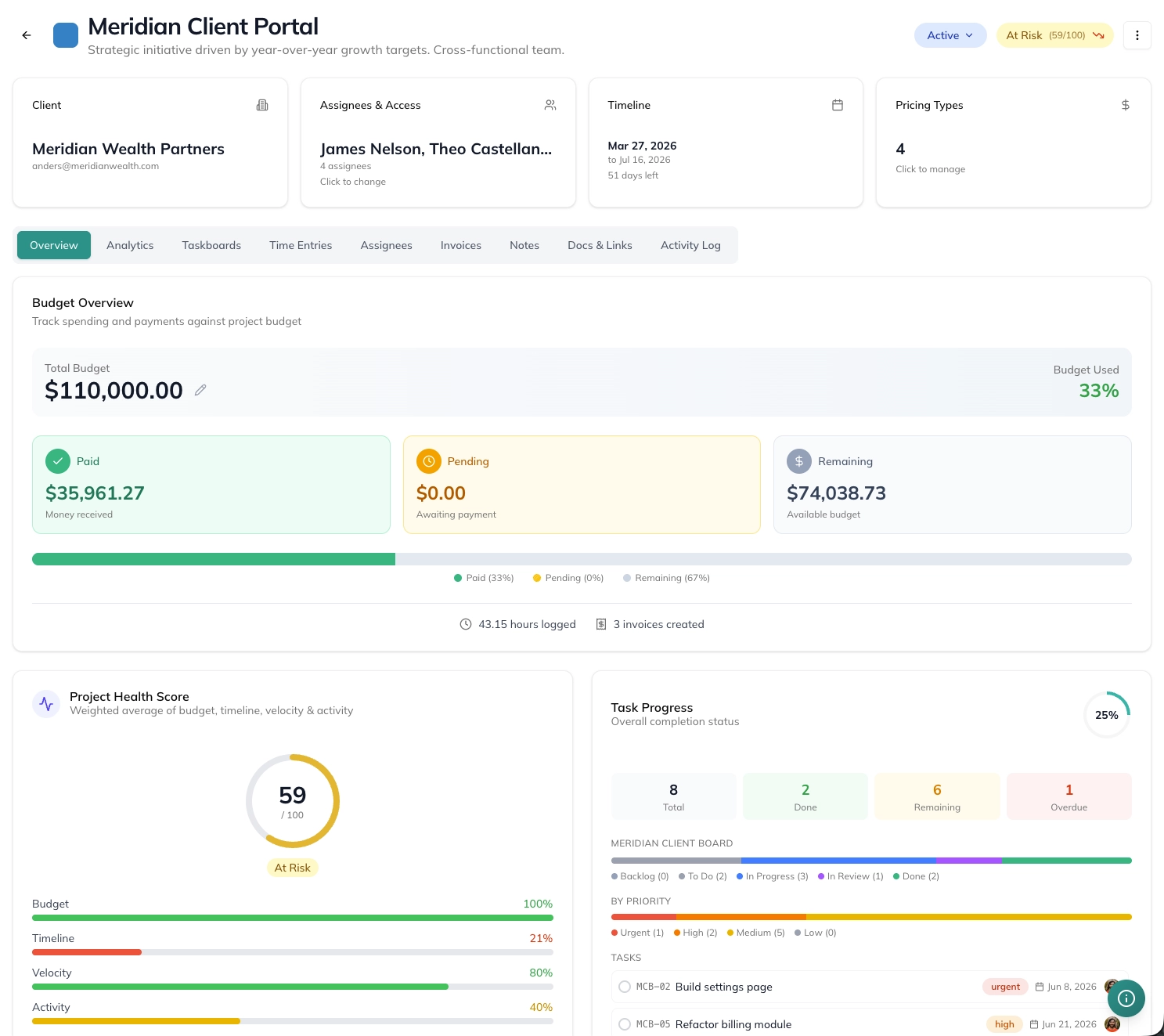
A FeatureFlight project showing budget overview, project health score, and task progress in one view
Live budget vs. burn

Budget against billable time entries and sent invoices. Watch the burn line in real time, not at month-end.

Forecasts with risk flags

AI analysis projects timeline and budget weeks ahead, then flags scope risks and recommends fixes before they bite.

Capacity-aware staffing

See each user's full workload and capacity at a glance, so you know what to expect from them, when to route work to someone else, and when it's time to adjust the timeline.

Completion reports

Mark a project done and get a downloadable PDF with AI insights on what shipped, what slipped, and why.

03 / 17
Taskboards

Four views of the same work, your team's choice.

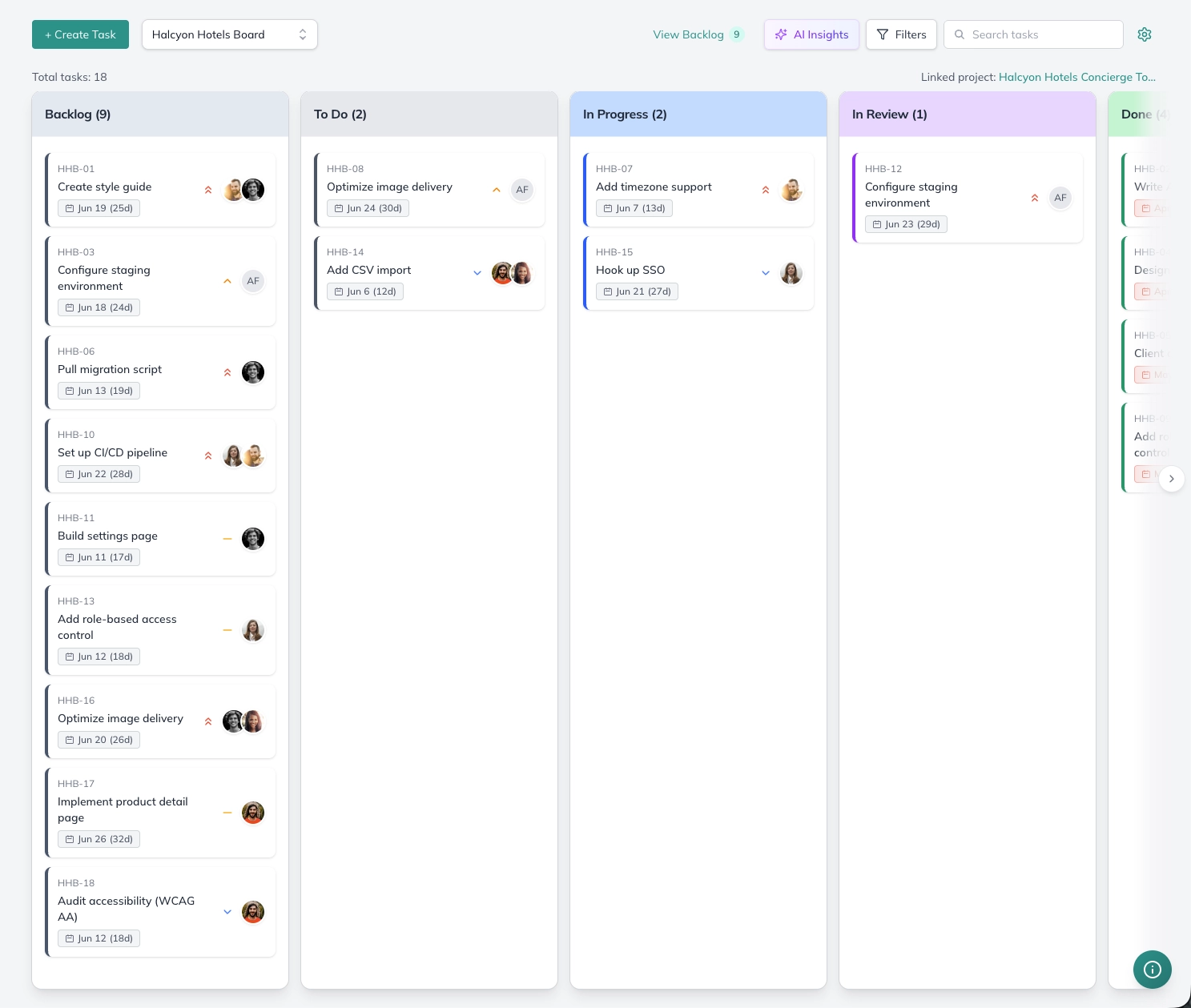
Kanban, timeline, list, table. Same data, every angle.

Drag-and-drop boards with custom fields, comments, and inline time tracking. Switch to a Gantt-style timeline, a list view, or table without leaving the board. Recurring work handles itself: set any task to repeat on a schedule, when it's completed, or when it moves into a specific column.

A FeatureFlight kanban board with Backlog, To Do, In Progress, In Review, and Done columns
AI
Taskboards AI

On every task, AI writes a description from the title, enhances the one you've already written, and estimates the hours required to complete it. Generate a full board, with tasks assigned to users or not, from a single sentence. Every Monday, get a written summary of the board: velocity, blockers, and what's drifting. When a task sits stuck and the assignee's capacity is maxed out, one click reassigns it to a teammate on the board who has room.

Four views, one source

Kanban for triage, Timeline for deadlines, List for sprint planning, Table for bulk edits.

Custom fields, your way

Add fields per board: priority, client, sprint, anything. Filter, sort, and group by them across every view.

Time on every task

Start a timer, log hours, leave a comment, all without ever leaving the card. Time entries flow straight to invoices.

Approval gates per column

Mark any column as approval-required. Tasks moved into it freeze until the reporter approves, then unlock and continue down the board. No QA step slips by.

04 / 17
Time tracking

Time tracking that becomes invoices automatically.

Tap a timer. Approve a sheet. Send an invoice.

Add time entries on any task. Log hours in bulk. Approve timesheets. Then turn approved time entries into a polished, sendable invoice in two clicks. No copy-paste, no spreadsheet gymnastics.

Track

Start a timer or log time in bulk against a task, project, or client, billable or non-billable.

Approve

Managers approve weekly timesheets with one click.

Bill

Approved time becomes an invoice with one more click.

Invoicing & payments

Get paid without leaving your project tool.

Built from your hours. Paid through Stripe.

Build invoices from tracked time, custom line items, or flat-fee project work. Send them with a public payment link. Get paid via Stripe. Track every dollar from draft to deposited.

Recurring · monthly retainer ready
Stripe payments

Public payment links, auto-receipts, instant deposit, with more processors on the way.

Recurring

Set it once. Bill the retainer every month, automatically.

AI summaries

Plain-English summaries of what's on the invoice. Clients actually read these.

Client Center

A lightweight CRM that knows what every client is worth.

Every client, every relationship, one tidy place.

Every client gets a full profile: contacts, status, owner, tags, custom fields, notes, and documents, plus the projects, boards, and invoices tied to them. Because it lives next to your time tracking and billing, each profile also shows what the relationship actually earns.

Profiles

Contacts, company details, tags, custom fields, notes, and files for every client.

Profitability

Effective rate, lifetime margin, unbilled work, and average days to pay.

Client AI

A health score for each account, plus the risks and opportunities worth acting on.

Client portal

A client portal that doesn't feel like 2015.

Let clients in on the work, not your whole workspace.

Invite clients as guests and share only the projects and boards you choose. They follow progress, comment on tasks, send requests, and pay their invoices from a simplified view, while your time tracking, financials, internal boards, and other clients stay private.

  • Guest access scoped to the projects and boards you pick
  • Clients comment on tasks and submit requests right on the board
  • They can view and pay the invoices you send them
  • A simplified home with their schedule, tasks, and project progress
  • Internal boards, time tracking, and financials stay hidden
Scoped access

Share specific projects and boards. Guests never see other clients or internal work.

Feedback in context

Comments and requests land on the task itself, not in a scattered email thread.

Pay online

Clients open the invoices you send them and pay without leaving the portal.

eSignature

Contracts signed where the client relationship lives.

Upload a PDF, place the fields, send. The signed copy files itself.

Send contracts, SOWs, proposals, and NDAs for legally binding electronic signature, straight from a client's Documents tab. Clients sign in the browser on any device, with no account needed, and the signed PDF lands back on their record automatically. No separate e-sign subscription, and no re-typing client details into another tool. Included on Pro.

  • Send any PDF from a client's Documents tab: contracts, SOWs, proposals, NDAs
  • Choose which of the client's contacts sign, and add a teammate to countersign
  • Drag-and-drop editor for signature, initials, date, text, checkbox, and dropdown fields
  • Clients sign in the browser from any device, no account needed
  • Portal clients also see documents waiting in a Signatures section
  • Automatic email reminders on day 3 and day 7, or nudge a signer yourself
  • Every signer's status (waiting, signed, declined) with timestamps
  • 5 signature requests per seat each month, pooled across your workspace
Filed on the client automatically

When the last person signs, the signed PDF and its signature certificate replace the original in the client's Documents tab, and a copy is emailed to everyone involved.

No account for your clients

Each signer gets a branded email with a personal, secure link. They see who sent it and where every signer stands, then sign in the browser.

On the client's timeline

Sends, signatures, reminders, declines, and completion all land in the client's Activity timeline, and you're notified in the app as people sign.

Included in Pro

5 signature requests per seat each month, shared across the workspace, so a 4-seat team gets 20.

09 / 17
Team messaging

Real-time team messaging, built into the work itself.

DMs, channels, and threads that live next to your projects.

Direct messages, group channels, threads, file sharing, reactions, mentions, and search, without leaving your project tool. And when typing stops being fast enough, jump into a Connect call straight from the conversation.

  • Direct and group channels with member management
  • Threaded replies that keep side conversations out of the main channel
  • File attachments, emoji reactions, and mentions
  • Online presence and full-text message search
  • Inline images and rich attachments
  • Jump from any DM or channel into a Connect call
10 / 17
Video & audio calls

Video calls and meetings, without the Zoom subscription.

Start a call from any page, or make it the room for your next meeting.

Connect is FeatureFlight's built-in audio and video calling. Start a call from the quick actions menu at the top of every page, jump in from a DM or channel, or set a meeting on the schedule to use a Connect room so everyone joins with one click. Screen sharing, an in-call chat, filters, and background options come standard, and there's no meeting link to paste from another app.

  • Audio and video calls with up to 10 people
  • Start a call from any page with the quick actions menu
  • Use a Connect room for scheduled meetings instead of Zoom or Google Meet
  • Screen sharing so everyone sees the same thing
  • In-call chat thread for links, notes, and quick questions
  • Video filters and background options
Call from anywhere

The quick actions menu lives at the top of every page. Start a call from a project, an invoice, or the dashboard without hunting for a thread.

Meetings that host themselves

Create an event on the schedule and set it to a Connect room. Invitees join the call right from the event. No outside meeting link.

Look ready on camera

Filters and background options keep the focus on you, not on whatever is behind you.

11 / 17
Docs & knowledge base

Internal docs that don't need a separate subscription.

Markdown, hierarchy, and AI that drafts the whole doc for you.

Markdown-based docs with hierarchy, sharing controls, attachments, mentions, and built-in AI. Describe what you need in a sentence ("write me a client proposal for X that covers Y and Z") and the doc is drafted for you. Keep your SOPs, client briefs, and meeting notes where the rest of your work lives.

Generate a full doc from a single prompt: proposals, SOPs, briefs, meeting notes
Hierarchical structure with public/private visibility
User mentions and threaded comments
Attach docs to the projects, tasks, and chats where they're needed
AI writing assistance to enhance, simplify, spell-check, and tighten structure
Spreadsheets in the same folders as your docs, with formulas and Excel import
12 / 17
Sheets

Spreadsheets that live next to the work they're about.

A real spreadsheet, attached to the client or project it belongs to.

Create a sheet right beside your docs, attach it to a client or project, and work in it together. Budgets, expense ledgers, and content calendars stop being loose files in someone's Drive and show up in the Documents tab of the client they're for. Paste straight in from Excel or Google Sheets, and export back out whenever you need a file. Included on every plan.

  • Typed columns: currency, percent, date, dropdown, person, checkbox, and more
  • Formulas that use column names, like [Budgeted] - [Actual], with 30+ functions
  • Filter, sort, and search, plus color rules that highlight a cell or a whole row
  • A summary row per column: sum, average, min, max, count
  • Copy and paste to and from Excel and Google Sheets, drag to fill, full undo
  • Templates to start fast: Budget, Expense Ledger, Content Calendar, Contact List
Attached to the client

Link a sheet to any client or project and it shows up in their Documents tab. Nobody has to ask where the latest budget lives.

Edited together, live

Autosaves as you type, and teammates' changes appear within seconds. Avatars show who's in the sheet, version history restores any earlier version, and view-only access covers people who should read but not edit.

Excel in, Excel out

Import an Excel or CSV file and keep its formatting, column widths, and row striping. Export to Excel whenever a client asks for a file.

13 / 17
Goals & OKRs

Set goals. Track them. Don't forget about them.

Any goal, any timeline, with manager check-ins built in.

Set a goal with any end-date: a quarterly objective, a performance review target, a weekly sync commitment, or anything in between. Loop in managers to track progress, run check-ins, and keep momentum from quietly evaporating.

  • Goals with custom end-dates, categories, and milestone tracking
  • Assign a manager or teammate to track progress and run check-ins
  • Fits quarterly OKRs, performance reviews, weekly syncs, or personal targets
  • Cross-user visibility with discussion threads on every goal
14 / 17
Teams & people

Every person, every team, every load.

Real-time capacity. Clear ownership. A live org chart.

See who's on what, what they're working on right now, and how loaded they are. Group people into teams to track capacity at a higher level. Plus a hierarchical org chart so everyone knows where they stand and who they report to.

Live capacity

Each user's load updates in real time as tasks are assigned, completed, or estimated up.

Teams as units

Roll people into teams. See team-level capacity and the projects each team is driving.

Org chart

A hierarchical view of the company (managers, direct reports, departments) auto-built from team membership.

15 / 17
Calendar & PTO

One calendar. Every schedule. Every PTO type.

Your Google and Outlook meetings, right next to your tasks, deadlines, and time off.

A team calendar that combines events, meetings, and PTO in one view. Connect Google Calendar or Microsoft Outlook and two-way sync keeps the two in step, so every outside meeting sits on the same grid as your work, and you can edit it without switching apps. Peek at any teammate's day with a Busy-only privacy mode, or stack multiple users to find shared availability. Time off comes with admin-defined PTO types, approval workflows, and full tracking.

  • Team calendar with events, meetings, and RSVPs
  • Two-way sync with Google Calendar and Microsoft Outlook (Outlook.com and Microsoft 365)
  • Edit or delete synced meetings in FeatureFlight, and changes save back to your calendar
  • Link up to 3 Google and 3 Outlook accounts, like work and personal, and show or hide each one
  • Host meetings in a Connect room, no Zoom or Google Meet link required
  • View any teammate's schedule (Busy-only privacy mode for private events)
  • Stack multiple users to find shared availability for a meeting
  • Booking links so clients and prospects can grab time on your calendar
  • Time off requests with admin-defined PTO types and approval workflows
  • PTO appears on every teammate's calendar so coverage is obvious
  • Optional toggle to surface your task deadlines alongside meetings and PTO
  • Holiday management and policy configuration
Find time, faster

Overlay teammates' calendars to spot a free slot. No 'when are you free?' threads.

PTO types that match reality

Vacation, sick, personal, parental, anything you define. Per-type accruals, balances, and approval rules.

Privacy you control

Show full event details to your team, or surface only Busy blocks for personal events. Up to you.

Google and Outlook, in sync

Outside meetings show up within seconds, Meet and Teams join links included, and FeatureFlight events go back out. Per account, bring in full details or just busy blocks.

16 / 17
Booking Links

Booking links that know your calendar and your clients.

Clients and prospects pick a time. It lands on your calendar.

Share a link and anyone outside your workspace can book time from your real availability, no account needed. The meeting lands on your FeatureFlight calendar and syncs to Google or Outlook, and when the booker is one of your clients, it's tagged to their account automatically. No separate scheduling tool. Included on every plan.

  • Booking links for any meeting: 15 to 120 minutes, by video, phone, or in person
  • A permanent personal booking page for every member
  • Open times built from your working hours, buffers, and minimum notice
  • Google Calendar and Outlook busy time, time off, and company holidays are blocked out
  • Optional approval mode: review each request before it's confirmed
  • Per-link limits: total bookings, max per day, an expiry date, or one specific person
  • Confirmation with a calendar invite, plus reminders 24 hours and 1 hour before
  • Bookers see times in their own time zone and can reschedule or cancel from their email
Bookings that know your clients

Send a link from any client contact. When a client books, the meeting is tagged to their account, shows up in their activity feed, and attaches to their project when there's just one active.

Booking from the client portal

Clients in your portal can book time with the people working on their account directly. No link to dig out of an old email.

Time logged after the call

After a client meeting, FeatureFlight prompts you to log the time, prefilled from the meeting, so billable calls don't slip through the cracks.

Protected from spam

Bot protection, rate limits, optional email verification, and daily caps. Block a person or a whole email domain, or get a fresh URL if a link leaks.

17 / 17
Admin & permissions

The owner's view of the whole business.

Company billing, per-user revenue, and permissions you can fine-tune.

Admins get a high-level view of company billing, then drill into any user to see exactly what they're bringing in, the projects and tasks on their plate, and deep analytics on their utilization. Roles set sensible defaults, then fine-tune individual users when reality doesn't fit a template.

Billing at a glance

Total revenue, MRR, outstanding AR, and average days-to-pay, without exporting a CSV.

Who's bringing in what

Per-user revenue with trends, plus task and project load, so you can see your top contributors and your bottlenecks.

Roles, then exceptions

Assign a role for a sensible baseline. Then override specific permissions for the users who need more (or less).

Woven through everything

The AI isn't a separate tab.

It reads the projects, tasks, hours, and invoices already in your account, so it answers with your numbers instead of generic advice. Included on Pro — not a per-seat add-on.

Task AI

Spins up an entire taskboard (tasks, assignees, deadlines, and hour estimates) from a single sentence. Writes and enhances task descriptions, estimates effort per task, and ships weekly board-wide summaries with deep analytics.

Project AI

Generates a complete project (budget, deadlines, taskboards, and a scheduled kickoff meeting) from a single sentence. Powers live project analytics with risk flags and AI deep-dives, plus a featured AI insights report the moment a project wraps.

Dashboard AI

A personalized daily briefing, the first thing you see when you log in. Tells you what to work on today, what deadlines are coming up, what meetings you have, and what to get a head start on for tomorrow.

Doc AI

Writing assistance baked into every doc: create, enhance, simplify, spell-check, and tighten the structure of anything you've written.

Client AI

Per-client intelligence reports and portfolio-wide insights surfaced from your real work.

Invoice AI

Plain-English invoice summaries that clients actually read and understand.

Stop running your business across seven apps.

Get the full Pro plan free through Dec 31, 2026. Set up your first project in under five minutes.

Founding Customer Program · Free through Dec 31, 2026 · No credit card required