
Most client onboarding checklists are really the agency’s admin to-do list. Create the folder, set up the Slack channel, add them to the CRM, send the welcome packet. All fine. None of it is why onboarding goes wrong.
Onboarding goes wrong because of waiting. The contract gets signed, everyone’s excited, and then the project sits for two weeks because the brand files haven’t shown up, nobody can get into the Google Analytics account, and three people on the client side each think someone else is approving the homepage. The deadline doesn’t move, though. So your team eats the delay.
So this agency client onboarding checklist is built around two jobs, and only two:
- Get every input you need before the project clock starts.
- Make the client feel good about hiring you in the couple of weeks right after they’ve paid, when they’re watching closest.
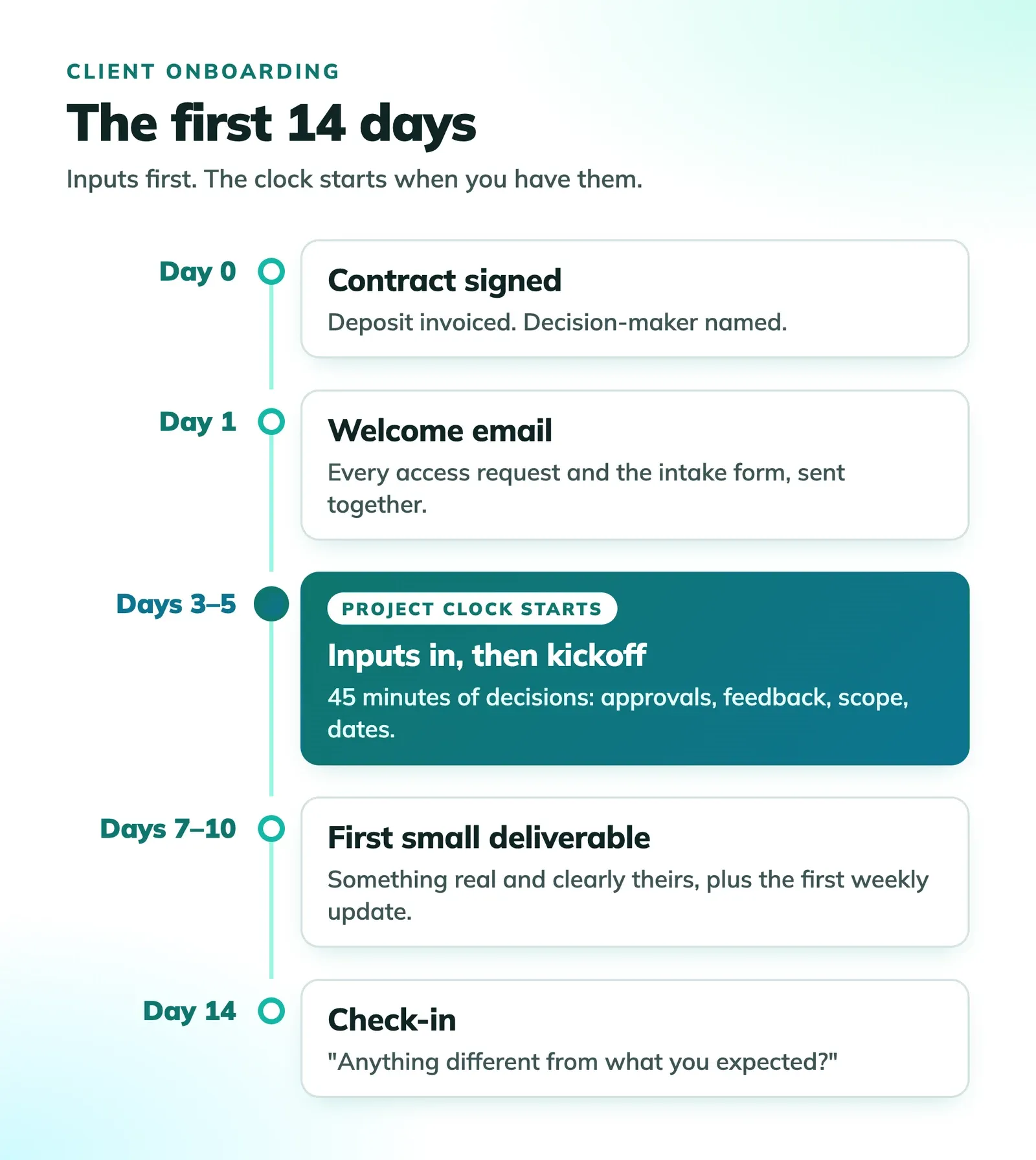
Here’s the one idea I’d take away even if you skip the rest: the project timeline should start on the day you have everything you need, not the day the contract is signed. Put that in writing and about half of the usual onboarding pain goes away.
There are twelve steps below. If you’re short on time, six of them are the ones that actually break projects when you skip them:
- A start-date clause in the contract (step 1)
- Deposit paid before work starts (step 2)
- One named decision-maker (step 3)
- Access requested properly (step 4)
- A kickoff call that makes decisions (step 7)
- Something small delivered in week one (step 10)
The other six make things smoother. These six keep the project from going sideways.
Why onboarding is really a waiting problem
In the productivity metrics post I mentioned wait time: the share of a project’s elapsed time spent blocked on someone else. When teams measure it for the first time, it’s often more than half. And the worst stretch is usually the first two weeks, because that’s when you need the most from the client and they’re least set up to give it.
Here’s what that costs, roughly. Say you’ve booked two people on a new project for the first month, 30 hours a week each, at a blended $125 an hour. That’s $7,500 of capacity per week. If kickoff slips by a week waiting on logins and files, you either scramble to find other work for those 60 hours or you eat them. Either way the client never sees that cost, and it never shows up in your pricing.
That’s why most of this checklist is about inputs and decisions, not welcome gifts.
Stage 1: Before kickoff
The deal’s signed. Nothing has started yet. This stage is where most of the value is, and it’s the part agencies rush.
1. A contract with a start-date clause
Most agency contracts list a start date and a delivery date. That’s the trap. If the client takes ten days to send you what you need, you’ve lost ten days you’re still on the hook for.
Tie the timeline to your inputs instead. Something like:
The project timeline begins on the date [Agency] receives the signed agreement, the deposit, and the items listed in Schedule A. Delivery dates are calculated from that date. Delays in providing feedback or materials extend the timeline by the same number of business days.
Schedule A is just the list of what you need: files, logins, content, the name of the approver. Keep it short and specific. “Brand assets” is vague. “Logo in SVG, brand color codes, and font files or font names” is something a person can actually go gather.
I’m not a lawyer, and you should have yours look at the wording. But the idea is what matters. Once the clock is tied to inputs, the client has a reason to send them quickly, and you don’t have to nag.
2. Deposit paid before any work starts
Not “invoiced.” Paid. For project work, 30% to 50% upfront is common. For retainers, bill the first month in advance.
This isn’t just about cash. A client who has paid is a client who shows up to the kickoff call. It’s also your first look at how they pay. If a deposit takes three weeks and four reminders, that’s how every invoice will go, and you’d rather learn that now than at month three. (If you need to send one quickly, the free invoice generator will do it.)
3. One named decision-maker
Ask for this directly, and write the name down: “Who has final say on approvals for this project?”
You want exactly one person. Other people can give input, and often should. But their feedback goes to the decision-maker, who combines it and sends you one answer. Without this, you’ll get conflicting comments from three people, you’ll pick one, and the other two will be annoyed at the next review.
If the client can’t name one person, that tells you something important, and it’s much better to find out before the first design review than during it.
4. Access, requested the right way
This step causes the most delays of anything on the list, and most of it comes from asking for the wrong thing. Don’t ask clients for their passwords. Ask them to give you your own access. It’s more secure, it doesn’t break when they change a password, and it’s easy to remove when the work ends.
The quick version for the platforms that come up most:
| Platform | What to ask for |
|---|---|
| Google Analytics | Add your email as a user in Admin, then Access Management, with the role you actually need |
| Google Ads | Accept a link request from your manager account |
| Meta (Facebook and Instagram) | Add your business as a partner in Business Settings |
| Shopify | Approve your collaborator request |
| WordPress | Create a user account for you, not a shared admin login |
| Domain and DNS | Usually nothing. Ask them to make changes, or add you as a delegate if their registrar supports it |
| GitHub | Invite you as a collaborator, or to their organization |
Two practical tips. First, send these requests yourself wherever the platform lets you (Google Ads and Shopify both work this way), so the client only has to click approve. Second, send all of them on day one, in one email, as a checklist. Access requests sent one at a time over two weeks are how two weeks disappear.
When credentials really can’t be avoided, use a password manager’s sharing feature. Never email, never a shared doc.
5. A short intake questionnaire
Most intake forms are too long. Ask forty questions and you’ll get rushed answers to all forty. Ask nine and you’ll get real ones.
Ask only what changes how you’ll do the work:
- What does success look like in six months? How would you measure it?
- Who’s the decision-maker, and who else needs to be consulted?
- What have you tried before, and what didn’t work?
- Who are you trying to reach, in your own words?
- Who are two competitors you watch, and what do you think of them?
- Is there a date we can’t miss? Why that date?
- Anything that’s off-limits? (Words, colors, topics, platforms.)
- How do you prefer to hear from us, and how quickly do you expect replies?
- What’s the one thing that would make you regret hiring us?
Question 9 is the one most people leave out, and it’s the most useful. Clients answer it honestly, and the answer is almost always a past bad experience with another agency. Now you know what to be careful about.
Send it before the kickoff call, not during. Read the answers first so the call can go deeper than the form did.
6. A welcome email within 24 hours
Right after signing is when clients second-guess the decision most. A quick, specific email helps a lot. Keep it short and practical, not a brochure:
Hi Jordan,
Really glad to be working together. Here’s what happens next so nothing’s a surprise:
- This week: I’ve sent access requests for Analytics, Ads, and Shopify. They’re one click each. The intake form is linked below and takes about 15 minutes.
- Kickoff: Once we have those, we’ll meet for 45 minutes. I’ll send an agenda the day before.
- Your timeline starts the day we have everything from Schedule A. The sooner that’s in, the sooner you’ll see the first work.
Your main contact on our side is Sam, and you’ll hear from us every Friday with a short update.
Alex
That’s it. It tells them what to do, when things happen, and who to talk to. A 20-page welcome packet doesn’t do any of that better.
Stage 2: The kickoff call
7. A kickoff agenda built around decisions
Most kickoff calls are an hour of introductions and restating the proposal. That’s a waste of the one meeting where you have everyone’s full attention.
By the time you meet, you’ve read the intake answers and you have access. So use the call to decide things. A 45-minute agenda that works:
- 5 min: Quick intros, only the people who’ll actually be involved day to day.
- 10 min: Your read of the intake answers. “Here’s what we heard. What did we get wrong?” This is where you find the misunderstandings.
- 15 min: Decisions. Who approves, how feedback gets to you, what’s in scope and what isn’t, and the dates that can’t move.
- 10 min: The first two weeks, step by step, including what you need from them and when.
- 5 min: Questions, then confirm the next meeting.
Send a written summary the same day. The decisions part matters most. Weeks later, when someone asks “wait, who approved this?”, that email is your answer.
8. Define “done” and how feedback works
Two things to settle out loud, because both lead to scope creep when nobody says them:
- What counts as finished. For each deliverable, what does the client need to see to sign off? “The homepage is done when it’s approved in the staging link” is clear. “When it looks good” isn’t.
- How revisions work. How many rounds are included, what counts as a round (one combined set of feedback from the decision-maker, not a stream of comments over a week), and what happens after the last one.
If you ever need to send a change order later, this conversation is what makes it feel fair instead of petty.
9. Communication rules
Agree on where conversations happen, how fast each side replies, and what counts as urgent. For example: questions go in the project thread, replies within one business day, and a phone call only when something’s actually on fire.
Setting this up early is kinder than it sounds. Clients are rarely demanding on purpose. They just don’t know what’s normal for you, so they guess, and the guess is usually “immediately.”
Stage 3: The first two weeks
10. Ship something small in week one
This is the most underrated step on the list. The client has paid, sat through a kickoff, filled out a form, and clicked a bunch of access requests. So far they’ve done a lot of work and seen nothing from you.
Give them something real within the first week. It doesn’t have to be big. An audit of their current analytics with three findings. A sitemap. A first set of rough layouts. A competitor teardown. It just has to be clearly theirs and clearly useful.
It shows you listened on the kickoff call, and it shows the project is moving. It also gives you an early, low-stakes chance to see how they give feedback before anything expensive depends on it.
11. The first scheduled update
Pick a day and send an update every week, even when there isn’t much to say. Three short sections is plenty: what got done, what’s next, and what we need from you.
The third section does the most work. It keeps your requests in front of the client every week without you having to chase anyone.
12. The day-14 check-in
A short call, or even an email, two weeks in. Ask two questions:
- “Is anything different from what you expected so far?”
- “Is there anything we should be doing differently?”
Clients almost never bring up small annoyances on their own. They save them up until they turn into a big one. This check-in catches them while they’re still small.
Onboarding advice I’d skip
Some common advice either doesn’t help or makes things worse.
The big welcome packet. A long PDF with your history, values, team bios, and process diagrams. Clients skim it once, if at all. Everything they actually need fits in the welcome email above. If you want a reference doc, make it one page and make it about them, not you.
The giant questionnaire. Covered above, but it’s worth repeating because it’s everywhere. Long forms get lazy answers and cost you trust before the project starts. Ask fewer questions and read the answers closely.
A shared chat channel on day one, with no rules. Shared channels can work well, but opened on day one without response-time expectations, they turn your team into on-call support. Set the communication rules (step 9) first. Then open the channel if you still want it.
“Over-communicate.” You’ll see this on nearly every onboarding list. The intent is right, but in practice it means lots of messages the client has to sort through. What clients actually want is to know when they’ll hear from you and what they need to do. A predictable weekly update does that better than extra messages.
Onboarding the client before you onboard your own team. Easy to miss. Which brings me to the last piece.
Hand off from sales to delivery before kickoff
If the person who sold the project isn’t the person running it, the client shouldn’t have to explain themselves twice. Before the kickoff call, whoever closed the deal should write down:
- What the client said they wanted, in their words
- What was promised, especially anything that isn’t in the contract
- Concerns or warning signs from the sales calls
- The decision-maker and anyone else with influence
- Budget, deadline, and how flexible each one really is
Keep this where the whole team can find it: on the client’s record, not in someone’s inbox. Six months from now, when a new person joins the account, this is the page they’ll read first.
What “onboarded” actually means
Onboarding should have a clear finish line so it doesn’t quietly drag on for a month. A client is onboarded when:
- The contract is signed and the deposit has cleared
- You have every item on Schedule A
- The decision-maker is named and the feedback process is agreed
- The kickoff summary has been sent
- The first deliverable is in their hands
- The day-14 check-in is done
If any of those are missing at day 21, something’s stuck. It’s worth a direct conversation now rather than a tense one later.
Where to start
Don’t try to roll out all twelve steps with your next client. Pick the two that would have saved you the most pain on your last project. For most agencies, that’s the start-date clause and sending every access request on day one. Add those to your contract and your welcome email this week.
Then turn the rest into a template. A simple checklist you copy for each new client is enough. The point is that nobody has to remember the steps, so they don’t get skipped when things are busy.
And if you want a single number to watch, track the days between a signed contract and the first deliverable. Every step here is really about shrinking that number. If it’s shrinking, your onboarding is getting better.

Brendan Shulman
Founder & CEO, FeatureFlight
Brendan Shulman is the founder and CEO of FeatureFlight and a software engineer with a passion for building useful, intuitive products. He writes about project management, productivity, software, and the lessons he’s learning while building and growing FeatureFlight.
Keep reading
- How Many Tools Is Your Agency Paying For? A Tool Sprawl Audit, With Real Prices
What a typical agency software stack costs at 1, 5, and 20 people, which tool sprawl stats hold up, and a 90-minute audit to decide what to keep, merge, or cut.
- 15 Productivity Metrics Every Team Should Track (And the 5 That Actually Matter)
Fifteen productivity metrics for agencies and freelancers, with the formula for each one, what a healthy number looks like, and which five to start with.